The Inspiration
As an avid reader, I've often felt the urge to write short passages myself—whether inspired by a particular story, exploring a creative idea, or simply experimenting with narrative styles. Over time, this casual interest evolved into a genuine need for a dedicated writing tool that could support my creative process.
Searching for suitable applications, I found none that really suited my needs. Even more limiting, finding a robust creative writing application that works seamlessly on Linux—my primary operating system—limited my options to virtually only one.
None of the options that supported Linux offered the combination of features I was looking for: AI assistance for creative exploration, proper manuscript organization, cross-platform availability, cross-device synchronization, and a clean, distraction-free interface.
Faced with this gap in the market, I decided to build my own solution. Inkspire was born from this necessity—a writing application designed by a developer curious about writing, for writers, with the flexibility and power that modern creative work demands.
Preview of Inkspire (Pre-Alpha)
Below is an early preview of Inkspire's interface in action. This pre-alpha build showcases the core writing environment, workspace organization, and some of the integrated panels that make manuscript management effortless.
Note: Click the video to open it fullscreen in a new tab for a better view.
Preview of the AI Cover Assistant (Initial Version)
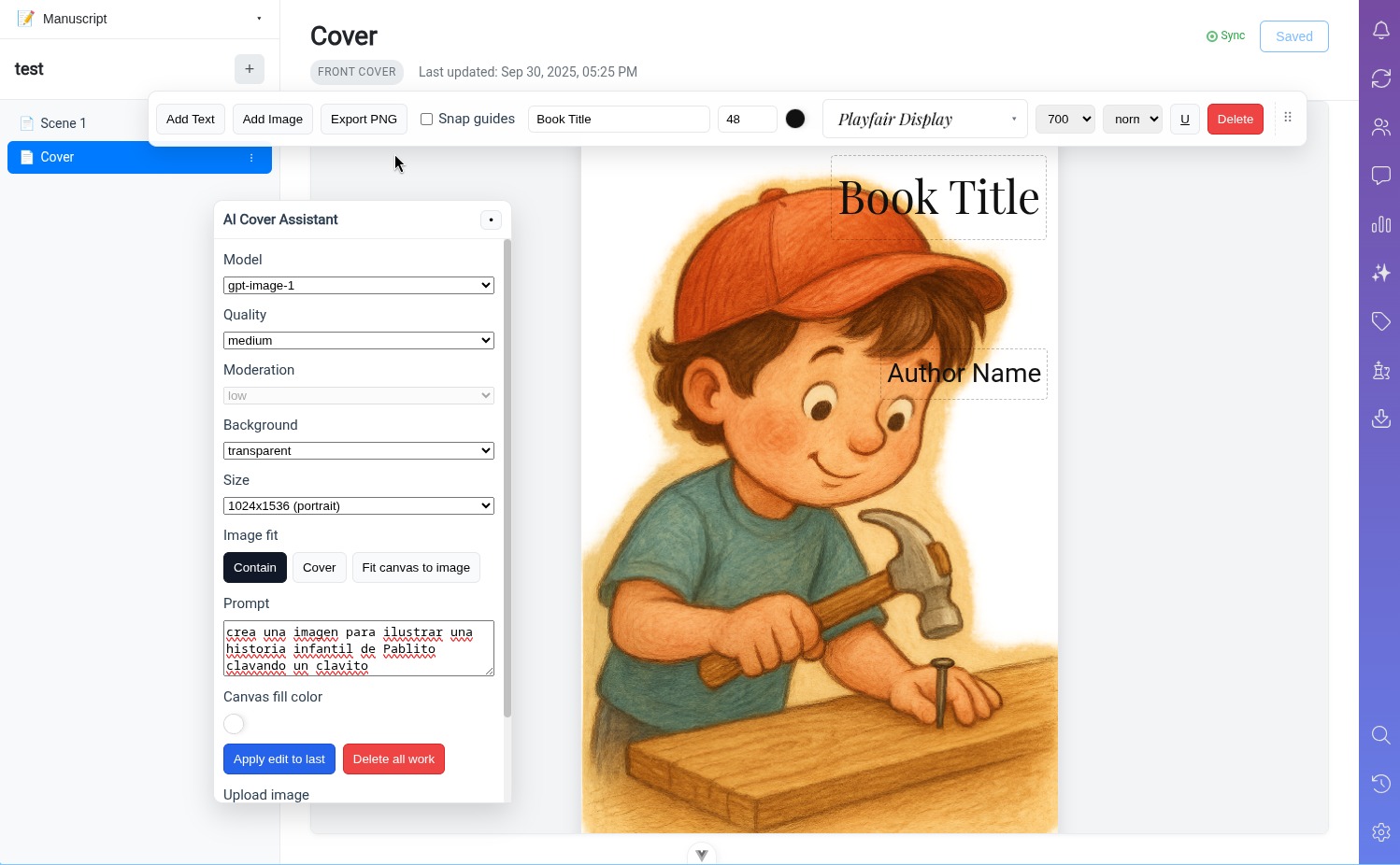
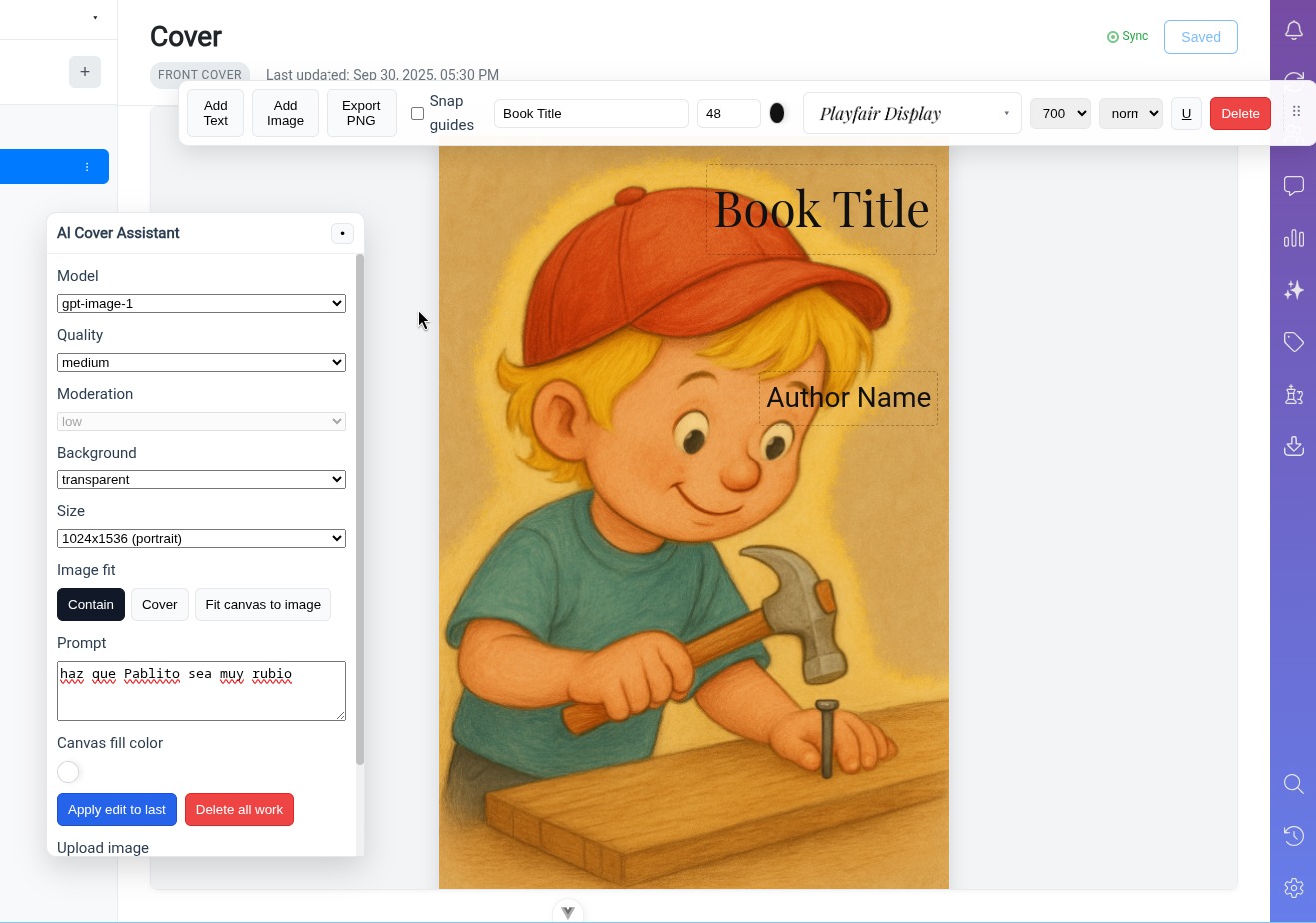
One of Inkspire's standout features is the AI Cover Assistant, which helps authors generate professional book cover concepts using advanced AI image generation. This tool is designed to spark inspiration and provide a starting point for cover design, whether you're self-publishing or working with a designer.
The images below demonstrate the iterative process: the first shows an initial prompt requesting a children's book cover, and the second shows refinements made through a follow-up prompt to adjust the style and elements.
Note: Click any image to open it fullscreen in a new tab.
Stack & Architecture
Inkspire is built on a modern, truly multiplatform technology stack that enables a single codebase to run seamlessly across Windows, Linux, macOS, iOS, and Android. This approach ensures consistency across devices while significantly reducing development and maintenance overhead.
Core Technologies
Vue.js: Powers the reactive user interface with a component-based architecture that keeps the application responsive and maintainable. Provides embeddable components for the editor.
Node.js: Serves as the runtime for both the Electron desktop environment and backend services, providing a unified JavaScript ecosystem.
Electron: Enables desktop application packaging for Windows, Linux, and macOS, providing native system integration while maintaining web technology compatibility.
Ionic/Capacitor: Handles mobile deployment to iOS and Android, wrapping the Vue.js application in native containers with access to device APIs.
Backend Architecture
The backend leverages a microservices architecture to handle the diverse functionality of the application:
- Document Service: Manages manuscript storage, versioning, and synchronization
- AI Service: Handles all AI-powered features (chatbot, cover assistant, in-text assistance)
- Collaboration Service: Manages real-time messaging, notifications, and shared workspace features
- Authentication Service: Secures user accounts and handles authorization
- Media Service: Processes and stores images, covers, and other media assets
This modular approach allows each service to scale independently and be maintained or updated without affecting other parts of the system.
Leveraging Mature Libraries
To accelerate development and ensure reliability, Inkspire makes extensive use of state-of-the-art, battle-tested libraries:
- TipTap: Rich text editing with custom collaborative editing capabilities
- Pinia: State management for complex application data flows
- Axios: HTTP client for reliable API communication
- Socket.io: Real-time bidirectional communication for collaboration features
- OpenAI API: Powers the AI chatbot, cover assistant, and in-text AI features. Since it is based in a microservice, it will allow us to easily switch to better providers that might enter the market at some point in the future
- SQLite/IndexedDB: Local database for offline-first functionality
By building on proven foundations rather than reinventing the wheel, Inkspire can focus on delivering unique value to writers while maintaining stability and performance.
Key Features
Inkspire is designed to be a comprehensive creative writing environment with powerful features that adapt to each author's unique workflow.
Customization & Accessibility
Multilingual Support: Write and navigate the interface in multiple languages, making Inkspire accessible to authors worldwide.
Highly Configurable: Customize nearly every aspect of the interface—fonts, spacing, panel layouts, keyboard shortcuts, and more.
Dark and Light Modes: Choose between carefully designed themes that reduce eye strain during long writing sessions, whether you prefer working in daylight or late at night.
AI-Powered Writing Assistance
AI Chatbot with Professional Profiles: Access specialized AI assistants tailored to different aspects of writing:
- Editor: Provides structural feedback, pacing suggestions, and plot coherence analysis
- Proofreader: Catches grammar errors, typos, and style inconsistencies
- Creative Consultant: Helps with character development, world-building, and narrative techniques
- Genre Specialist: Offers genre-specific advice (mystery, romance, sci-fi, etc.)
AI Cover Assistant: Generate professional book cover concepts using AI image generation. Iterate on designs with natural language prompts until you find the perfect visual representation of your story.
In-Text AI Assistant: Get real-time help without leaving your manuscript:
- Creative Suggestions: Generate alternative phrasings, metaphors, or narrative approaches
- Proofreading: Instant grammar and style checks with context-aware corrections
- Style Alternatives: Experiment with different writing styles (more descriptive, more concise, more formal, etc.)
- Continuity Checks: Ensure consistency in character details, timelines, and world-building elements
Manuscript Organization
Workspace Structure: Organize your entire creative project in one place. You can create as many workspaces as you want:
- Research Workspace: Store reference materials, character sheets, world-building notes
- Character Development: Dedicated space for character profiles, arcs, and relationships
- Manuscript Workspace: Keep chapters, scenes, and drafts organized and accessible
- Media Assets: Store cover concepts, maps, illustrations, and other visual materials
Folder Hierarchy: Create nested folder structures that match your thought process, whether you organize by acts, POV characters, timelines, or any other system.
Professional Writing Tools
Synchronization Status Panel: Real-time visibility into which documents are synced to the cloud, ensuring your work is always backed up.
Notifications Center: Stay informed about collaboration updates, AI task completions, and system messages without interrupting your flow.
Collaborator Messaging: Built-in messaging system for co-authors, editors, or beta readers working on the same project.
Writing Statistics: Track your progress with detailed metrics:
- Word count (daily, weekly, total)
- Writing sessions and time spent
- Chapter/section completion percentages
- Productivity trends over time
Embeddable Mini-Applications: Insert specialized tools directly into your editor:
- Timeline visualizer for plotting chronology
- Character relationship maps
- Quick reference cards for world-building details
Tagging System: Tag characters, locations, plot threads, or themes throughout your manuscript for easy reference and continuity tracking. You can also create custom tags and search for them using the Advanced Search Panel.
Structure Guidelines: Optional structural templates for different narrative formats:
- Three-act structure
- Hero's journey
- Save the Cat beats
Advanced Search: Powerful search across your entire manuscript and workspace:
- Full-text search with regex support
- Filter by tags, folders, or date ranges
- Search within specific characters' scenes or POV sections
- Find and replace with context preview
Automatic Version History: Never lose your work or regret a major revision:
- Automatic snapshots at configurable intervals
- Manual checkpoint creation for significant milestones
- Easy browsing and restoration of previous versions
- Compare versions side-by-side to track changes
- No storage limits on version history
Inkspire is currently in active development (pre-alpha stage). While the core features are functional, the application is not yet available for public use. Development updates and eventual release information will be shared through this website and associated channels.